
Husky + Lint-staged + Commitlint + cz-git 配置 Git 提交规范
前言
本文介绍如何通过 Husky + Lint-staged + Commitlint + Commitizen + cz-git 来配置 Git 提交代码规范。 核心内容是配置 Husky 的 pre-commit 和 commit-msg 两个钩子:
- pre-commit:Husky + Lint-staged 整合实现 Git 提交前代码规范检测/格式化 前提:ESlint + Prettier + Stylelint 代码统一规范;
- commit-msg: Husky + Commitlint + Commitizen + cz-git 整合实现生成规范化且高度自定义的 Git commit message。
Husky
Husky 是 Git 钩子工具,可以设置在 git 各个阶段(pre-commit、commit-msg 等)触发。 官方网站:typicode.github.io/husky
Husky 安装有 自动安装 和 手动安装 两种方式 。
官方推荐自动安装的方式,使用 husky-init 命令一次性完成依赖自动安装和配置
# pnpm exec husky init && pnpm install
pnpm dlx husky-init && pnpm installTIP
- 添加
prepare脚本到package.json - 创建一个
pre-commit可以编辑的示例挂钩(npm test 默认情况下,将在提交时运行) - 配置Git钩子路径
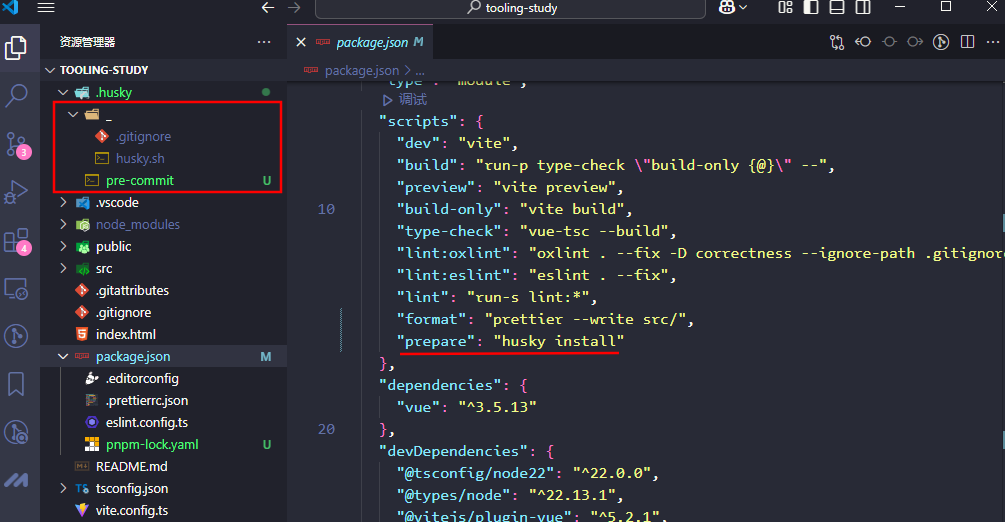
自动生成的 .husky 目录和指令:
"scripts": {
    "dev": "vite",
    "build": "run-p type-check \"build-only {@}\" --",
    "preview": "vite preview",
    "build-only": "vite build",
    "type-check": "vue-tsc --build",
    "lint:oxlint": "oxlint . --fix -D correctness --ignore-path .gitignore",
    "lint:eslint": "eslint . --fix",
    "lint": "run-s lint:*",
    "format": "prettier --write src/",
    "prepare": "husky install"
  },
Lint-staged
lint-staged 是一个在 git add 到暂存区的文件运行 linters (ESLint/Prettier/StyleLint) 的工具,避免在 git commit 提交时在整个项目执行。 官方网站
Lint-staged 安装
pnpm add -D lint-stagedLint-staged 配置
检测/格式化配置
package.json 中添加不同文件在 git 提交执行的 lint 检测配置
"lint-staged": {
  "*.{js,ts,jsx,tsx,vue}": [
    // scripts脚本也是一样的
    "pnpm run prettier",
    "pnpm run lint"
  ],
  "*.{js,ts,jsx,tsx}": [
    "prettier --write",
    "eslint --fix"
  ],
  "*.{cjs,json}": [
    "prettier --write"
  ],
  "*.{vue,html}": [
    "eslint --fix",
    "prettier --write",
    "stylelint --fix"
  ],
  "*.{scss,css}": [
    "stylelint --fix",
    "prettier --write"
  ],
  "*.md": [
    "prettier --write"
  ]
}添加 lint-staged 指令
package.json 的 scripts 添加 lint-staged 指令
"scripts": {
    "lint:lint-staged": "lint-staged"
},修改提交前钩子命令
根目录 .husky 目录下 pre-commit 文件中的 npm test 修改为 pnpm run lint:lint-staged
pnpm run lint:lint-staged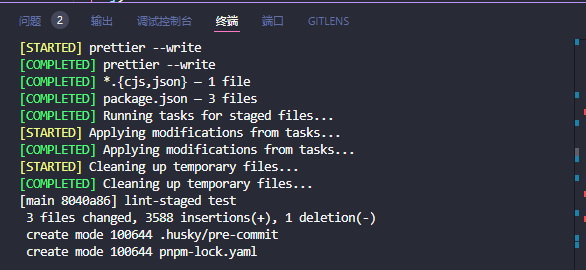 Git 提交代码检测 发现正常校验 ⬇️
git add .
git commit -m 'lint-staged test'Commitlint
Commitlint 检查您的提交消息是否符合 Conventional commit format。
Commitlint 安装
参考 官方安装文档
pnpm add -D @commitlint/cli @commitlint/config-conventionalCommitlint 配置
根目录创建 commitlint.config.cjs 配置文件,示例配置: @commitlint/config-conventional
/* eslint-disable no-undef */
module.exports = {
  // 继承的规则
  extends: ['@commitlint/config-conventional'],
  // @see: https://commitlint.js.org/#/reference-rules
  rules: {
    'subject-case': [0], // subject大小写不做校验

    // 类型枚举,git提交type必须是以下类型
    'type-enum': [
      2,
      'always',
      [
        'feat', // 新增功能
        'fix', // 修复缺陷
        'docs', // 文档变更
        'style', // 代码格式(不影响功能,例如空格、分号等格式修正)
        'refactor', // 代码重构(不包括 bug 修复、功能新增)
        'perf', // 性能优化
        'test', // 添加疏漏测试或已有测试改动
        'build', // 构建流程、外部依赖变更(如升级 npm 包、修改 webpack 配置等)
        'ci', // 修改 CI 配置、脚本
        'revert', // 回滚 commit
        'chore', // 对构建过程或辅助工具和库的更改(不影响源文件、测试用例)
      ],
    ],
  },
}添加提交信息校验钩子
执行下面命令生成 commint-msg 钩子用于 git 提交信息校验,命令来自:@commitlint/README.md
pnpx husky add .husky/commit-msg "pnpx --no -- commitlint --edit $1"hook 🔨 生成配置如下:
#!/usr/bin/env sh
. "$(dirname -- "$0")/_/husky.sh"

# 用于检查当前提交信息是否符合规范
pnpm commitlint --edit $1Commitlint 验证
正确的提交格式:<type>(<scope>): <subject> ,type 和 subject 默认必填
❌ 不规范的 commit msg,提交失败
git commit -m '错误的提交'✅ 不规范的 commit msg,提交失败
git commit -m 'feat:错误的提交'Commitizen & cz-git
- commitizen: 基于Node.js的
git commit命令行工具,辅助生成标准化规范化的 commit message。--官方文档 - cz-git: 一款工程性更强,轻量级,高度自定义,标准输出格式的 commitizen 适配器。--官方文档 其它
commitizen适配器cz-customizable、cz-conventional-changelog
Commitizen & cz-git 安装
npm install commitizen -g
pnpm add -D cz-gitcz-git 配置
修改 package.json 指定使用的适配器
"config": {
  "commitizen": {
    "path": "node_modules/cz-git"
  }
},cz-git 与 commitlint 进行联动给予校验信息,所以可以编写于 commitlint 配置文件之中(⇒ 配置模板)。
import { defineConfig } from 'cz-git'
import { execSync } from 'child_process'
import fg from 'fast-glob'

const gitStatus = execSync('git status --porcelain || true').toString().trim().split('\n')
const getPackages = (packagePath) => fg.sync('*', { cwd: packagePath, onlyDirectories: true })

const scopes = [
  ...getPackages('packages'),
  ...getPackages('src'),
  'docs',
  'play',
  'project',
  'core',
  'style',
  'ci',
  'dev',
  'deploy',
  'other',
  'typography',
  'color',
  'border',
  'var',
  'ssr',
  'types',
  'deps',
]
const scopeComplete = gitStatus
  .find((r) => ~r.indexOf('M  packages'))
  ?.replace(/\//g, '%%')
  ?.match(/packages%%((\w|-)*)/)?.[1]

const subjectComplete = gitStatus
  .find((r) => ~r.indexOf('M  packages/components'))
  ?.replace(/\//g, '%%')
  ?.match(/packages%%components%%((\w|-)*)/)?.[1]


export default defineConfig({
  extends: ['@commitlint/config-conventional'],
  rules: {
    'subject-case': [0], // subject大小写不做校验
    // type[scope]: [function] description msg
    'scope-enum': [2, 'always', scopes],
    // 类型枚举,git提交type必须是以下类型
    'type-enum': [
      2,
      'always',
      [
        'feat', // 新增功能
        'fix', // 修复缺陷
        'docs', // 文档变更
        'style', // 代码格式(不影响功能,例如空格、分号等格式修正)
        'refactor', // 代码重构(不包括 bug 修复、功能新增)
        'perf', // 性能优化
        'test', // 添加疏漏测试或已有测试改动
        'build', // 构建流程、外部依赖变更(如升级 npm 包、修改 webpack 配置等)
        'ci', // 修改 CI 配置、脚本
        'revert', // 回滚 commit
        'chore', // 对构建过程或辅助工具和库的更改(不影响源文件、测试用例)
      ],
    ],
  },
  prompt: {
    messages: {
      type: '选择你要提交的类型 :',
      scope: '选择一个提交范围(可选):',
      customScope: '请输入自定义的提交范围 :',
      subject: '填写简短精炼的变更描述 :\n',
      body: '填写更加详细的变更描述(可选)。使用 "|" 换行 :\n',
      breaking: '列举非兼容性重大的变更(可选)。使用 "|" 换行 :\n',
      footerPrefixesSelect: '选择关联issue前缀(可选):',
      customFooterPrefix: '输入自定义issue前缀 :',
      footer: '列举关联issue (可选) 例如: #31, #I3244 :\n',
      generatingByAI: '正在通过 AI 生成你的提交简短描述...',
      generatedSelectByAI: '选择一个 AI 生成的简短描述:',
      confirmCommit: '是否提交或修改commit ?',
    },
    // prettier-ignore
    types: [
      { value: 'feat',     name: '特性:     ✨  新增功能', emoji: ':sparkles:' },
      { value: 'fix',      name: '修复:     🐛  修复缺陷', emoji: ':bug:' },
      { value: 'docs',     name: '文档:     📝  文档变更', emoji: ':memo:' },
      { value: 'style',    name: '格式:     🌈  代码格式(不影响功能,例如空格、分号等格式修正)', emoji: ':lipstick:' },
      { value: 'refactor', name: '重构:     🔄  代码重构(不包括 bug 修复、功能新增)', emoji: ':recycle:' },
      { value: 'perf',     name: '性能:     🚀  性能优化', emoji: ':zap:' },
      { value: 'test',     name: '测试:     🧪  添加疏漏测试或已有测试改动', emoji: ':white_check_mark:'},
      { value: 'build',    name: '构建:     📦️  构建流程、外部依赖变更(如升级 npm 包、修改 vite 配置等)', emoji: ':package:'},
      { value: 'ci',       name: '集成:     ⚙️  修改 CI 配置、脚本',  emoji: ':ferris_wheel:'},
      { value: 'revert',   name: '回退:     ↩️  回滚 commit',emoji: ':rewind:'},
      { value: 'chore',    name: '其他:     🛠️  对构建过程或辅助工具和库的更改(不影响源文件、测试用例)', emoji: ':hammer:'},
    ],
    useEmoji: true,
    emojiAlign: 'center',
    useAI: false,
    aiNumber: 1,
    themeColorCode: '',
    scopes: [],
    allowCustomScopes: true,
    allowEmptyScopes: true,
    customScopesAlias: 'custom',
    emptyScopesAlias: 'empty',
    upperCaseSubject: false,
    markBreakingChangeMode: false,
    allowBreakingChanges: ['feat', 'fix'],
    breaklineNumber: 100,
    breaklineChar: '|',
    skipQuestions: [],
    issuePrefixes: [{ value: 'closed', name: 'closed:   ISSUES has been processed' }],
    customIssuePrefixAlign: 'top',
    emptyIssuePrefixAlias: 'skip',
    customIssuePrefixAlias: 'custom',
    confirmColorize: true,
    maxHeaderLength: Infinity,
    maxSubjectLength: Infinity,
    minSubjectLength: 0,
    scopeOverrides: undefined,
    defaultBody: '',
    defaultIssues: '',
    defaultScope: scopeComplete, // 默认scope
    customScopesAlign: 'top',
    // customScopesAlign: !scopeComplete ? 'top' : 'bottom',
    defaultSubject: subjectComplete && `[${subjectComplete}] `, // 默认提交描述
    allowCustomIssuePrefix: false,
    allowEmptyIssuePrefix: false,
  },
})添加提交指令
package.json 添加 commit 指令
"scripts": {
  "dev": "vite",
  "build": "vite build",
  "preview": "vite preview",
  "lint:eslint": "eslint \"src/**/*.{vue,ts,js}\" --fix",
  "lint:prettier": "prettier --write \"**/*.{js,ts,json,css,less,scss,vue,html,md}\"",
  "lint:stylelint": "stylelint  \"**/*.{css,scss,vue,html}\" --fix",
  "prepare": "husky install",
  "lint:lint-staged": "lint-staged",
  "commit": "git-cz"
},cz-git 验证
执行 commit 指令进行代码提交流程,执行前需将改动的文件通过 git add 添加到暂存区
pnpm commit执行命令之后会出现询问交互 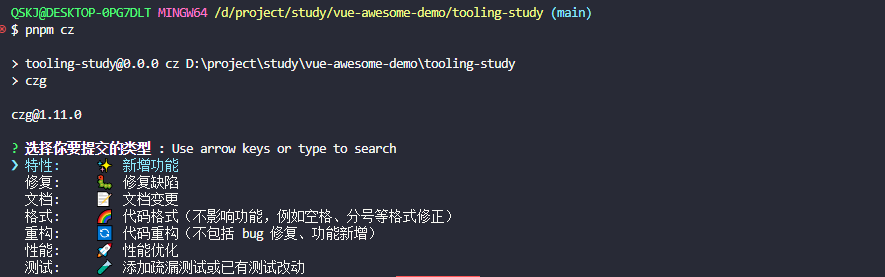
- empty:选择这个选项后,你将提交一个空范围的提交消息。这意味着你不会对提交进行特定范围的描述,只提交简单的提交消息。
- custom:选择这个选项后,你可以自定义范围来描述你的提交内容。你可以键入你想要的范围,以更准确地描述你的提交。
commit 之后触发pre-commit校验提示信息, 之后git push推送到远程仓库